




Hidden Features on the GMC Sierra 1500 Denali

There was a time when pickup trucks were simply regarded as workhorses to carry things. By contrast, the GMC trucks you’ll find at Ewing Buick GMC are amazingly sophisticated. Even before you get to the range-topping Denali range, you may find more features than you can keep track of. But the more you know, the more you enjoy, so here is a brief rundown of some better and lesser-known GMC Sierra features.
How to Super Cruise
Super Cruise has been described by more than one automotive source as the best self-driving technology currently on the road. Many other driver assist systems insist you keep your hands on the wheel. By contrast, when Super Cruise is engaged, you can take your hands off the wheel and feet off the pedals in confidence as the truck heads down the highway. The system will even change lanes on its own. Part of the magic is that SuperCruise works on roads that have been pre-mapped into a database by GM, so the vehicle knows where it is and what to expect. GM has mapped approximately 400,000 miles of road at this point.
To activate Super Cruise, you first engage your adaptive cruise control to set a desired cruising speed. When that is done, activate the Super Cruise system by pushing the button on the left steering wheel spoke with the steering wheel & lanes icon. At first, the light on top of the steering wheel rim will turn blue while the vehicle determines where it is and if the road it’s on is mapped. If it is, the light will turn green enabling you to release your hands and feet from the controls. It is important however that you keep your eyes on the road. There are things your eyes are still better at spotting such as tire retreads on a dark road, a light gray box on a light gray road, and so on. You will also need to retake control of steering and foot controls in the following situations:
- Encountering unusual traffic situations or objects
- Merging into traffic
- Exiting the highway
- Making a turn or stop for crossing traffic or a traffic light, stop sign, or other traffic control device
- Entering a construction zone
- Any time there are several pedestrians in the area
Locks and LEDs
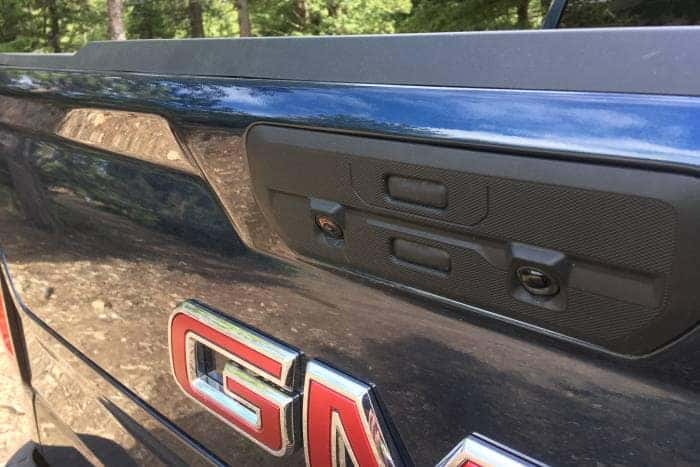 If you have the MultiPro Tailgate, lucky you! And by now we’re sure you have already learned how to configure its cab step, load step, seat, and desk modes. A hidden feature is that with the keyfob of your person, you can lock the multi-pro tailgate by pressing and holding the top button until the tail lights blink. To unlock, simply repeat the process.
Upper trim levels have what may appear to be turn signal repeaters on the side mirrors; a feature on many other vehicles but in fact, these are actually very bright LED spotlights. To activate them first make sure the truck is in Park. Then, look to your light controls to the left of the steering wheel and push a button that looks like a single light angled downward. You will find another button showing a pickup truck profile with a light shining down on the bed. This will turn on lights around the cargo bed, as well as a separate light on the tailgate that is aimed toward a trailer hitch connection. These lights also only operate when the truck is in Park.
Changing Your Information Display
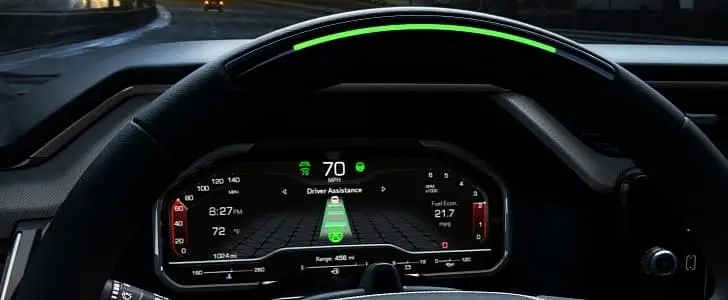 The vehicle information display in the center of your gauge cluster provides a wide variety of vehicle information and is controlled by the rotary control on the right steering wheel spoke. What you may not know is that you can control what is displayed. To do this go to Settings and then select Information Display Settings. You will be presented with a long list of items as diverse as fuel range and brake pad life. You can decide which of these displays you want to see. You can choose them all if you like.
Choose Which Convenience Features Work For You
GMC trucks are extremely versatile vehicles that are used in many different ways by their owners. What may be a convenience feature to some could be a hindrance to others. Your Sierra allows you the ability to activate or defeat several of these features as you see fit. You find a list of these and the ability to engage or disengage them by going to Settings → Vehicle → Comfort & Convenience. Examples include:
- Buckle to shift – Prevents you from shifting to Drive if your seatbelt is not buckled.
- Mirror Reverse Tilt – This is useful if you regularly park your truck by the curb, or back into parking spaces. But if you mostly use reverse in other ways you may not want this feature. You can choose to enable or disable just the passenger side, driver side, or both.
- Automatic Folding Side Mirrors – When enabled, the mirrors will automatically fold in when the vehicle is shut off, keeping them from being a hindrance and possibly bumped in a tight spot.
- Rain Sensing Wipers – A sensor watches the windshield for raindrops and automatically engages the wipers when it detects them.
- Remote Window Operation – This is a handy feature that lets you air out your vehicle after being parked in the sun before getting in.
- Remote left in vehicle – If you leave your remote in the car it will alert you. A useful feature unless you regularly find it useful to leave your remote in your truck.
- Remote Removed from Vehicle – If you walk away from your truck with the remote while the engine is running it will alert you.
Ewing Buick GMC is proud of how the GMC Sierra model line is designed to both work hard and still be comfortable and convenient. To make your Sierra work best for you, spend some time going through the Settings menu and configure your truck in the way that works best for you. If you run across something and don’t know what it is please feel free to reach out to any of our Ewing Buick GMC Sales or Service professionals.
0 comment(s) so far on Hidden Features on the GMC Sierra 1500 Denali